A Timeline of AI and Me

Image from: thesecatsdonotexist.com
I have worked both as a software developer and video engineer for a long time. But I’ve always had an obsession with AI, and in particular, what I would call “AI weirdness”. The cats above are no exception. Over the last five years, AI went from something I would sometimes read about to something that I use every single day. I wanted to write down the moments that changed how I think about and work with AI, and add a few personal notes. This is primarily for myself to remember, because what happened just a few years ago feels like it’s been ages!
How it all began
I think my trip down the rabbit hole started when I visited the Uncanny Values exhibit in Vienna. It showcased — well, obviously — uncanny valleys between the real and the artificial. Also, at the time, the local unemployment agency AMS was testing AI-based algorithms to classify unemployed people, and that felt like a really bad choice in terms of dehumanizing the whole system and making everything more efficient at the cost of actual living people.
Now, this type of AI algorithm application is commonplace, from insurance to hiring, and it is often criticized for being biased and unfair, yet that’s where we are today. Screaming for human assistance to a telephone support agent that simulates typing and call center noises. (Although I found out that this is not a new thing.)
But before 2020, it wasn’t so obvious how quickly everything would evolve. Back then, speech was one of the first frontiers where AI did some interesting work from which you could tell that it might become useful sooner rather than later. That’s also when I learned about Google Tacotron. With respect to music, BachBot was a thing. Even before that, Iamus showcased music creation from AI. Kind of stupid and really not that useful, but promising.
Then in February 2019, OpenAI released GPT-2. Technologies like the Transformer architecture were gaining traction; they had been published two years prior. I kept reading up on the topic but never really did any hands-on work. This would change in the coming years.
Here are some memorable releases and events that changed how I work with AI, in chronological order. I might update this post later with more developments.
GPT-3, June 2020
This was the first time I saw a machine write whole paragraphs, and even bits of code, that somehow made sense. OpenAI had just opened up API access, and I did not change anything about my work because of it, but I started paying more attention. I began reading Gwern Branwen’s articles, such as on GPT-3 poems and fiction.
Quite early on (end of 2022-ish) I used GPT-3 to shorten text or do hard reformatting work such as converting between marked-up versions of a document and raw text, or converting tables between different formats. In fact, I even had GPT-3 convert a Python code base to TypeScript, which was quite flaky at the time, and it involved a lot of copy-pasting back and forth between the OpenAI Playground and my editor, but I made it work.
It would go like this:
Here is some Python code:

import os
import numpy as np

def foo(x):
    some_variable = [x * 2 for x in range(10)]

This is the same code in TypeScript using camelCase:

import * as os from 'os';
import * as np from 'numpy';

function foo(x: number): void {
    var someVariable = [x * 2 for range(10)];
}
You get the idea.
It’s funny how GPT-3 invented syntax elements that are of course very Python-esque and don’t exist in TypeScript — it happily hallucinated new syntax that was quite plausible. This was the first moment where I could actually achieve something that I thought was previously impossible and especially in the work context, do something that I put off doing because it just wouldn’t be worth the time. But now it was possible with just a few dollars of token-spend. And a good test suite, of course.
Here’s an image of how the playground looked like in December 2022:
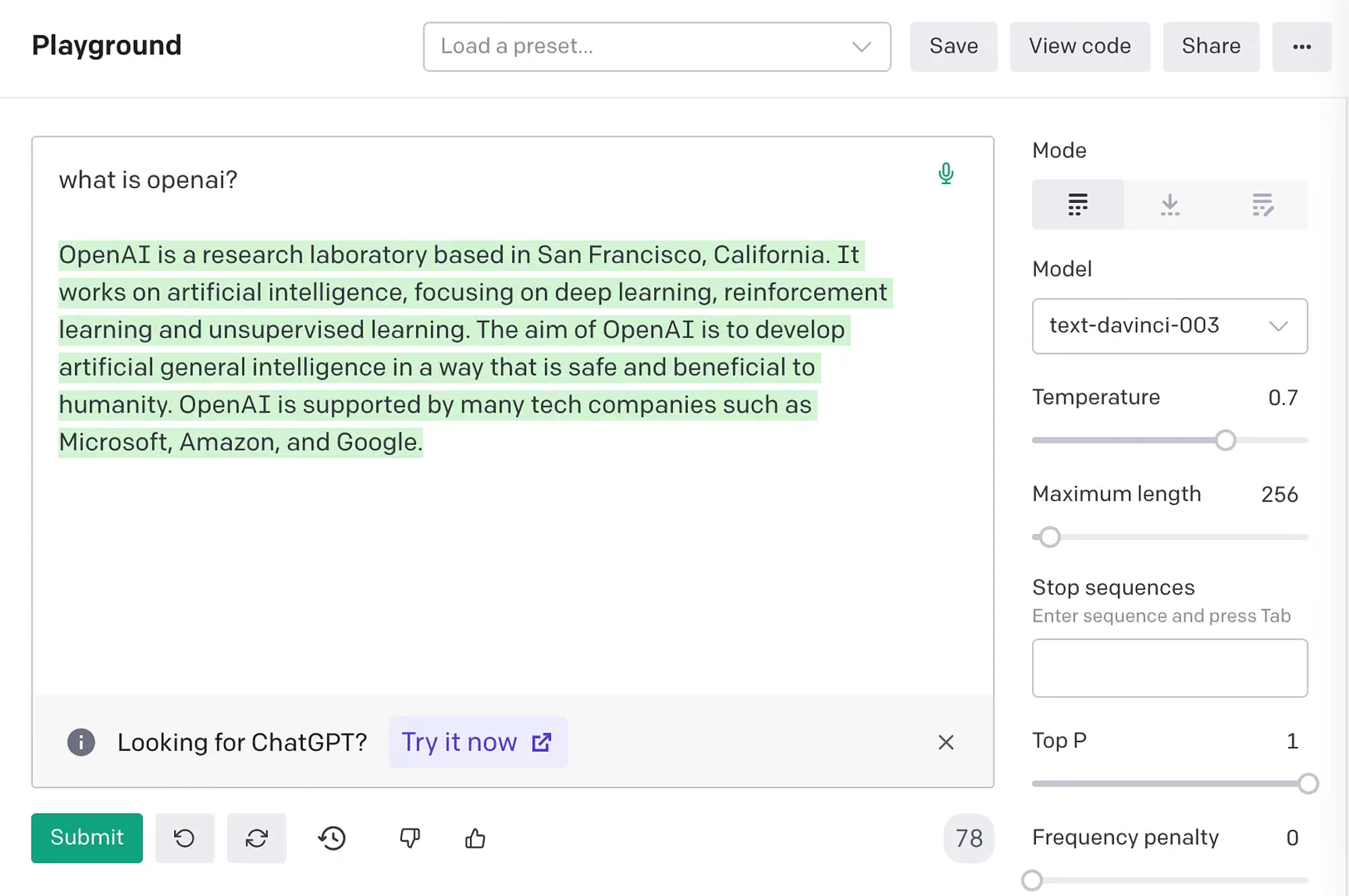
I remember spending a lot of time in this interface!
GitHub Copilot, preview 2021, general release 2022
This was the first one where I actually used AI. For work, for actual purposes. GitHub Copilot launched as a technical preview in 2021 and became generally available in 2022. I think I onboarded it almost immediately when it was available, via the student plan offered by GitHub.
I remember that it felt really weird to have somebody complete code for me. It was slow as hell. And it certainly changed the way that I wrote code. For example, I would add much more inline commenting to provide guidance for the next words or lines to appear correctly, because at the time the model just wasn’t that good and couldn’t really capture intent all that well. Like it wouldn’t even read more than a couple of lines prior to what you wrote, so it couldn’t capture context and it couldn’t read forward as well, let alone look into other files. But it was tremendously helpful for writing code like shell scripts where I can never remember the exact syntax, such as CLI options in Bash. Which is just tedious!
I have used Copilot inline auto-completions less and less, obviously, ever since adopting Cursor with the Tab completion model, and these days I write almost no code manually anymore, except on rare occasions, thanks to Codex and Claude Code. But I still have my Copilot tab completion turned on by default.
These days it feels like it’s getting in my way, so I often snooze it when I work on actual text that I need to write myself, or academic reviews and other material where it just would say things too soon and interrupt my actual thinking. Seems they added an “Eagerness” option now, but I’m too lazy to test-drive it.
ChatGPT, November 2022
This is the one everyone remembers. When ChatGPT was released, all of a sudden you could ask a question in plain words and get a real answer back. Of course I had been using GPT-3 through the API well before that, so I knew the strengths and weaknesses, but I had not really used a chat-trained model before.
Remember that, in its default variant, GPT-3 (text-davinci-003, Rest in Peace!) is not an “instruct” model (see here for some background), so it only completes after the last word that you gave it. If you wanted to use it for chatting, you would have to fake the whole chat conversation context! I think that is the interesting part about how these models work under the hood. Never forget that the actual chat is just a training on the specific syntax (ChatML or Harmony) that simulates a conversation between two or three parties. That is the human, the assistant, and the system itself.
I remember reading this one essay, “Implications of Simulators”, which is a rather philosophical post published on LessWrong by the pseudonymous author Janus. It explores the metaphysical and ethical consequences of living in “simulated realities”, developing a framework for understanding agency, consciousness, and prediction within the “simulator” paradigm. There must have been an earlier post that I cannot find anymore, which talked specifically about faking the conversation to evoke a chatbot-style context.
Also, I read a lot about the Waluigi Effect. It has to do with the fact that, since LLMs are operating on latent representations that only get transformed into actual tokens while prompting, you can elicit your output from different superpositions, or, so-called simulacra. Basically, Luigi vs. Waluigi exist at the same time, and the model may collapse into anyone of them based on your prompting. Good reading, very philosophical.
And I do find it worrying that these basic models are not available anymore via API. They’re an artifact of history, and deserve to be preserved. It’s not like they take up a lot of compute anyway.
In any case, many friends and I had fun (ab)using ChatGPT for all sorts of things, from researching what it purported to know about us, to generating short stories in the style of someone famous, to producing the lamest jokes on earth. Confidently wrong in many cases, but still fun to play with.
GPT-4, March 2023
With GPT-4, the jump in quality was really obvious. I think this is when it went from being a toy to something really useful.
Of course I used ChatGPT a lot during that time and explored different prompting strategies. I think I created my set of prompts that I could reuse for different purposes and primarily used them for generating initial code drafts.
OpenAI launched custom GPTs as a way to create a more personalized experience. I used them sparingly for things like “de-bullshitting” corporate speak, summarizing documents with explainers for laypersons, and translation jobs. But it never really felt like a game-changer for me, and it kind of died down after a while anyway.
One thing stuck though: in November 2023, Nick Dobos launched Grimoire. This was a custom prompt framework (released as a GPT) to specifically create multiple files that work together to create a bigger application. And while it suffered from a lot of hallucinations and not everything worked properly, I think it was the first foray into coding agents that thought beyond just single files.
Also, let’s not forget Sydney, the broken personality chatbot that Microsoft built on top of GPT-4, which was so amusingly misaligned.
Claude 3.5 Sonnet, June 2024
For me, Claude 3.5 Sonnet was the first model that felt good enough for real, almost unattended, work. Before it, AI coding was fun and definitely a small speedup, but unreliable and you had to constantly test the output. You’d have to think about the software architecture at a very low level, define interfaces and calling signatures carefully, lest the model hallucinate functions or functionality that wasn’t there.
After Claude 3.5 Sonnet, I could hand over a real task and mostly trust what came back. This is where my habits actually changed for good.
Around this time I stopped copying and pasting between a chat window and my editor. Instead I used Cursor, which could edit files for me. This is also around the time I started “vibe-coding” (that was not a term yet!) apps like the Praxisplan Wien, and spending more time reading code than writing it. I basically made the switch from Visual Studio Code to Cursor and really enjoyed working with their super fast tab completion model and the different choice of upstream model providers that they offered. Prior to that I had only been using OpenAI models, but this made me switch to Anthropic for some time.
What was very much noticeable from that period until my switch to Claude Code was the eagerness of Claude Sonnet to produce artifacts — Markdown files littering the repository explaining every minute detail of every feature it had just implemented, without caring about existing READMEs or documentation. I’m glad that this is no longer a thing models do.
Devin, the “AI software engineer,” March 2024
Cognition introduced Devin as “the first AI software engineer” and sold the idea of an AI that does the whole job, start to finish. I never used it in practice, but it was interesting to follow on Hacker News and other forums. Later, Manus emerged, with a similar purpose. I liked the idea; I could see how that might be useful, and it predated some of the more recent agent-based tools like Claude Code. And of course, all the prompt-to-code tools like Replit, Bolt, or Lovable launched. Never used any of them either.
I guess I’m just too attached to the idea of:
- having a human in the loop
- Linux philosophy (small, composable tools)
- not being reliant on a single vendor or model provider
I can see the appeal for frontend work, which I hate because it’s tedious and repetitive, and especially when it’s about getting results fast. Hey, that’s why I am still a Rails fanatic.
MCP, November 2024
Anthropic released the Model Context Protocol as a shared standard for plugging tools and data into a model via a common API. That meant you could imagine connecting someone else’s systems without writing a custom integration for every single tool. This was much more interesting to me than another chat UI, but the excitement faded pretty quickly when I discovered that setting up MCP servers was a mess, and the tool definitions required a lot of tokens on a very limited context. This was particularly pronounced for the Claude models I was using at the time, which had a smaller context window than OpenAI models. And they were also more expensive to use.
These days I do not use any MCP servers at all, with the exception of Playwright. I drive them through mcporter, which makes the servers much easier to manage and call, with lower token spend. From the authors: “skip the giant tool-schema prompt, generate a small typed surface, and let the agent or the human call MCP servers like normal functions”.
Well actually, I do use MCP in the form of connectors that Claude exposes through their apps, e.g., for Google Workspace or HubSpot. But that’s somehow hidden in their product offering.
Also worth reading is Mario Zechner’s post from “that period”. I say “that period” and it’s just 10 months ago! I similarly came to the conclusion that good, well-defined CLIs are all that’s needed. I’d later build, with Claude, CLIs for Trello and HubSpot, with a much smaller footprint but all the capabilities of an MCP server. I would go as far as saying that if you have CLI tools that all behave the same way, then you don’t even need to give the model specific instructions on how to use them.
DeepSeek R1, January 2025
As someone who runs a bootstrapped company, I looked at this less from a “here’s a fancy new model” angle but more as a “what, there are other vendors?” story. DeepSeek R1 was released as a really well-performing open model, with a permissive license and prices that were competitive. I toyed around with it for a while, but I did not find it compelling enough to switch from the models I was already using. Plus, our company workspace had Gemini Pro access built-in, and that was my daily chat driver.
Plus, the hosting in China was a bit suspicious for me. Not that it’s any better having the other models hosted in the US, though! I wish we had better alternatives in Europe, but the market isn’t big enough yet, and/or the EU just again managed to kill innovation before it even started cough AI Act cough.
“Vibe coding” gets a name, February 2025
Andrej Karpathy gave a name to something I had already been doing on quiet evenings, for all the projects I’d never have time for. Describe what you want and let the model build it. In my case, using Cursor agents. I was already doing this for little web apps and experiments, as mentioned above. I also built an Image-to-ICS converter and a timestamp conversion tool which I use very frequently.
I also vividly remember Pieter Levels’ Flight Simulator, which he completely vibe-coded. In fact, it’s probably this Pieter guy who has been virally tweeting about products like his Photo AI generator. Building in public and all, he also showcased how you can take off-the-shelf models like Stable Diffusion and build an actual, revenue-generating product around it. And he was, by no means, an expert in this field, just a guy with a laptop and good business ideas.
This all highlights what was about to come anyway: the proliferation of AI tools and models, and the fact that you don’t need to be a PhD in machine learning to build something useful. (Taste is what matters, kids. Taste, and a vision.)
Claude Code, preview February 2025, general release May 2025
This changed my daily work more than anything since Copilot. Anthropic introduced Claude Code as a limited research preview in February, and then made it generally available with Claude 4 in May. I began toying around with it, and I started a Claude subscription. It’s also when I cancelled Cursor.
First I had to fight the frustration of having to use a terminal UI. To this day I still don’t like these UIs. I just want to copy and paste things from clearly defined windows. I want to use my traditional macOS text editing shortcuts. Interactive context. Links, etc. Paste images and see them, ffs. Perhaps Claude Code for Desktop and OpenAI’s new Codex app would solve these problems; as of June 2026 I have yet to try them because now I do prefer the composability and flexibility of a terminal agent.
With Claude Code, the leap from Cursor agents was apparent. You could now hand a task to an agent in the terminal and let it read files, run commands, and come back with a result, with a much stronger grip on my intents, less dumbness (Cursor does something with my code before handing it off to the models; this impacts quality), and faster execution.
Learning to close the feedback loop was one of the most valuable lessons. Any time the model would prompt you for input (e.g., open this for me, run this command for me, etc.), you should think about automating that part as well. Over time, I developed more extensive routines and agent loops, and skills helped me formalize those approaches.
Claude Desktop/Mobile
I also subscribed to Claude for its desktop application and mobile app, and this is the first time I’d given it enough context about the company, and turned on memory (a feature I always disable on other platforms), so it could give better advice to me as a founder. This has worked quite well, and I am still paying for the subscription, although I am finding no use for any of the advanced features they offer, like:
- Claude Code via the desktop app
- Artifact generation (.docx etc. – I’d rather work in Markdown, or have a
/docxskill in my agent) - Claude Design (used it, but the output is rarely adaptable to my needs)
Skills, October 2025
With Agent Skills, you could pack your own knowledge and (repetitive) steps into a folder that the model would pick up when it was needed. I had been writing little cheat sheets and notes for years, such as prompt template libraries that I’d paste into Claude Code when needed, or dedicated notes in CLAUDE.md, but now everything’s much more universal.
I think Skills made MCP mostly obsolete, except maybe for the use case where a non-technical user needs to plug in something into their UI-only chat box. Apart from that, I very much prefer having APIs available that are debuggable.
Hey, even my company has a public skills repo now.
OpenClaw and the always-on agent, January 2026
Ah, OpenClaw. I never used it, didn’t have time to fight the configuration. I tried setting it up twice and got stalled at the part where you need a dedicated phone number. Since it runs on your own machine and answers you through the chat apps you already use, it seems very useful, but I never managed to find a compelling use case. Right now I’d rather stay in the loop with my daily tasks, and outsource only what can be completely automated in a somewhat deterministic way.
I might try NanoClaw at some point though.
I’ve had enough with Claude, August 2026
The Claude Opus output style is driving me mad – see my other post. So much so that I prefer Codex with GPT-5.6 these days. Its word choices and sentence structures are just so much more comprehensible. It leads me to think that Anthropic have reinfored a particular style during their training pipeline that just leads to better model results, at the expense of readability for humans. Fine. Opus is still useful for planning, and it seems to make better design choices, but for fast, daily work, my main provider is now OpenAI again.
I like Claude again, September 2026
As I am writing this only a few weeks later, I’ve moved back to Claude Code with Opus 5.5. It is a leaner model, it is faster, more intelligent, and it doesn’t use the Claudish language as much as its predecessor. It can still be observed in the documentation it writes, but I have various skill files (and other approaches) to remove that later on. Its turn taking is much nicer to work with. I still rely on GPT-6 Sol for occasional implementations or when Claude is not available. My success with GPT-6 Astra has been limited; its code quality is abysmal, as others have pointed out, and I haven’t had the time to adapt to its idiosyncrasies.
What is still worrying, 2025 and beyond
Somewhere this year I became more suspicious of my own habits. Karpathy told people to “keep AI on the leash”, and said of his own work: “I’m still the bottleneck.”
I noticed the same thing in my own work. If I let the machine do too much, I have to context-switch more. You end up building more stuff but you are “always on”. While in the early days you’d hesitate to switch off the computer because there was this one thing you needed to fix, now it’s that one prompt you’re going to send to the agent.
Also, hallucinations did appear here and there (although they are very rare now). That one time I had accidentally let Copilot auto-complete a non-existing citation into my BibTeX file. Luckily, my co-author discovered the issue before we submitted the paper. But it was a good reminder that you should always check what the model outputs, and not blindly trust it.
Studies also started to point in the same direction: more code, but sometimes less validation; more speed, but also more supervisory work.
Luckily, I’d gathered a lot of experience in the 15 years prior, but I am still unsure how this is going to play out if I stop writing code myself. (At least I wrote this post, huh.) And even more worryingly, I am not sure what that means for the next generation of software engineers or computer scientists. As I am co-supervising a Bachelor thesis right now, it’ll be interesting to see how the students are going to cope with this new reality.
Yann LeCun, one of the people who is somehow present in this modern AI space, also kept pushing back on the hype. He has been arguing for world models for years, and he’d be pointing out that language models are still mostly trained on text. But I don’t know if I agree with the pessimism.
In general, many AI skeptics seemed to be very vocal in 2025, but not anymore in 2026. Sure, if you are working on an obscure technology that only a handful of people on earth can master, then such models will likely not replace you completely. But: Claude Code has arrived in many large organizations, and people use it as their daily driver for almost everything. People brag about their token spend, and I do wonder how much ROI they have actually achieved.
It has even reached the absurd point where you participate in Slack discussions between folks who just paste their Claude analysis into the chat window. I see vibe-coded designs everywhere, sure. I get it, outsourcing some of the thinking feels productive. I am guilty of this as well for some low-stakes projects or throwaway analyses. But when people start using agents to do the thinking for them, it gets frustrating because human conversations end up becoming imbalanced. “Yeah, I don’t know exactly, let me ask Claude how it did that.”
Oh, and all the people using AI to write LinkedIn engagement bait? I am thinking about blocking them. The worst part is: once you’ve seen Claudish speak, you can’t unsee it. I am developing a frustration reading my own agent’s outputs. Perhaps some more prompting will fix it…?